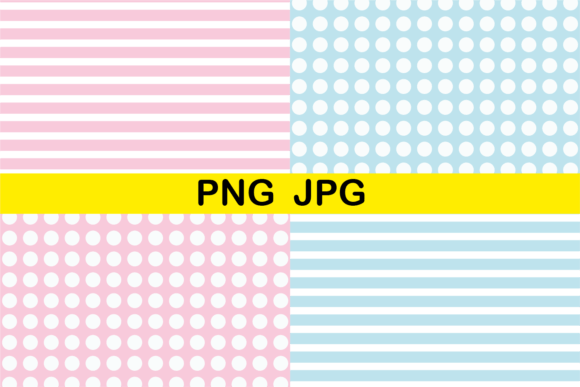
Dots and Lines Seamless Patterns
If you're designing anything that needs consistent, clean background texture—whether it’s a website banner, a printable planner, fabric mockup, or social media template—Dots and Lines Seamless Patterns offers a quiet kind of versatility. It’s not flashy, but it’s thoughtful: four distinct, carefully balanced patterns built from simple elements—dots and lines—that repeat smoothly edge-to-edge without visible seams.
What Makes These Patterns “Seamless”?
A seamless pattern repeats infinitely in all directions without gaps, jumps, or misaligned edges. That means when you tile it across a large surface—like a full-page document, a phone case design, or a textile preview—it looks like one continuous, cohesive texture. No awkward breaks. No guessing where to crop or how to blend. With Dots and Lines Seamless Patterns, each of the four designs has been tested and refined so the 12 × 12 inch canvas aligns perfectly at every border. You can scale, tile, or layer them confidently—no manual editing needed.
Designed for Real-World Flexibility
Each pattern comes in two high-resolution formats: JPG and PNG. That gives you options depending on your project. Use the JPG files for quick print layouts, presentations, or web mockups where background transparency isn’t required. Choose the PNG versions when you need crisp edges and transparent backgrounds—ideal for overlays, logo treatments, digital stickers, or layered UI elements.
All files are 300 dpi, meaning they hold clarity whether printed on stationery, business cards, or fabric swatches—or viewed up close on retina displays. At 12 × 12 inches, they offer generous real estate for cropping, zooming, or adapting to standard print sizes (A4, letter, square social posts) without pixelation.
Who Uses These—and Why?
Beginners appreciate how little setup these patterns require. If you’ve ever tried to build a repeating background in design software and ended up with mismatched edges or blurry exports, you’ll notice the difference right away. There’s no learning curve—just drag, drop, and go.
Freelancers and small business owners use them to elevate client work quickly: add subtle texture to invoice templates, brand presentation decks, or email newsletter headers. Educators embed them into worksheets or digital lesson slides to improve visual hierarchy without distraction. Bloggers and content creators apply them as gentle backdrops behind quote graphics or podcast cover art—adding polish without competing with text.
For makers and crafters, these patterns translate beautifully to physical projects. Print them on iron-on transfer paper for custom tote bags, use them as base layers in Cricut or Silhouette cut files, or adapt them for sublimation printing on mugs and notebooks. Since the resolution supports fine detail, even small-scale applications—like labels or packaging accents—retain crispness.
Practical Uses You Can Try Today
- Branding consistency: Apply one pattern across your Canva brand kit—social banners, story highlights, PDF pitch decks—to reinforce visual identity without repeating logos.
- Digital planning: Import a PNG into Notion or GoodNotes as a subtle page background for daily logs or habit trackers.
- Print-on-demand prep: Tile the pattern across a 24 × 36 inch canvas in Photoshop for wall art, then upload directly to platforms like Redbubble or Printful.
- Educational handouts: Layer a light dot-and-line pattern under bullet points or diagrams to guide the eye while keeping focus on content.
- Web design mood boards: Use one as a CSS background-image with
background-repeat: repeat;for live previews of site aesthetics.
What to Keep in Mind Before You Download
This is a digital-only product—no physical items will be shipped. You’ll receive an instant download link after purchase, so there’s no waiting or shipping tracking. Just make sure your device can open ZIP files (most computers and phones handle this automatically).
Because the files are high resolution and designed for flexibility, they’re larger than typical web images—so double-check your storage space if downloading on mobile. Also, while the patterns are neutral and versatile, consider your end use: if you plan to print on dark stock, the white-background JPGs may need adjustment—but the transparent PNGs give you full control over underlying color.
These aren’t editable vector files, so you won’t be able to change individual dot spacing or line weight after download. But that’s by design: the balance between simplicity and sophistication is already set. Think of them less like raw ingredients and more like ready-to-use pantry staples—reliable, consistent, and always on hand when you need quiet visual support.
Why Simplicity Works So Well
Dots and lines are foundational visual elements. They’re legible at any scale, culturally neutral, and easy on the eyes. Unlike bold florals or complex geometrics, these patterns recede just enough to serve their purpose—supporting content rather than demanding attention. That makes them especially valuable for accessibility-conscious design: they add rhythm and structure without overwhelming contrast or visual noise.
They also pair well with other textures. Try layering a faint line pattern beneath a bolder illustration, or using a subtle dot grid as a guide for hand-lettering alignment. Because they’re minimal, they don’t clash—they complement.
A Thoughtful Starting Point
You don’t need a big design budget or advanced software to make something feel intentional. With Dots and Lines Seamless Patterns, you get four thoughtfully made, production-ready options—each one built to save time, reduce decision fatigue, and deliver professional results, whether you’re prepping a single Instagram post or building an entire brand system.
No subscriptions. No watermarks. No guesswork about resolution or tiling. Just clean, calm, capable design assets—ready when you are.