Dinosaur Patterns & Digital Paper
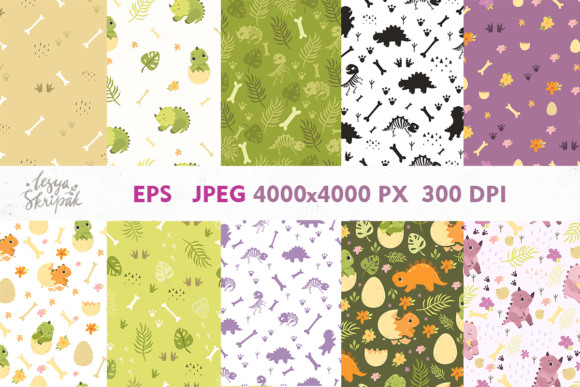
Imagine opening a folder and finding 10 perfectly seamless dinosaur patterns—each one crisp, playful, and ready to use at 300 DPI in both EPS and JPEG formats (4000×4000 px). No clipping masks to fix. No tiling glitches. Just clean, scalable, print- and screen-ready digital paper you can drop into any project.
What This Is—and Why It’s Not Just “Cute Graphics”
Dinosaur Patterns, Digital Paper is a curated set of repeatable surface designs featuring friendly, stylized dinosaurs—think gentle triceratops silhouettes, tiny stegosaurus clusters, or abstract dino-scale motifs—not photorealistic or intimidating, but warm, inclusive, and intentionally versatile. Unlike single-use clipart or low-res web images, these are production-grade assets built for real-world application: from printed stationery to digital course slides, from product packaging to social media templates.
The EPS format means vector scalability—zoom in, stretch across a banner, or shrink for a favicon without losing clarity. The high-res JPEGs ensure fast loading and broad compatibility, especially where vector support is limited (like certain email clients or basic design apps). Both formats share the same seamless tile logic, so your background wraps cleanly across any canvas size.
For Educators & Homeschoolers
A third-grade teacher might use one pattern as a calming classroom poster background—soft greens and gentle dinos help reduce visual overwhelm. A homeschool parent could print it on cardstock for custom flashcards or laminated learning mats. Here, reliability matters more than bells and whistles: no pixelation when enlarged on a projector, no licensing surprises when shared with parents via PDF, and colors that stay true when printed on school-grade printers.
For Small Business Owners & Makers
A ceramicist launching a line of kids’ mugs might overlay a subtle dino pattern onto product mockups—or even adapt it into a laser-etch template for textured glaze effects. A boutique stationery seller could integrate the pattern into digital download covers, invoice headers, or printable party kits. For them, commercial safety is non-negotiable: these files come with clear usage rights for physical and digital resale items, no attribution required. And because they’re delivered as ready-to-use files—not layered PSDs requiring design software—they save hours over building patterns from scratch.
For Designers & Freelancers
If you’re crafting brand identities for children’s brands, educational apps, or wellness products targeting young families, these patterns offer a trustworthy starting point—not just decoration, but tone-setting. One designer used the gentlest pattern as a subtle texture behind a client’s logo lockup, adding warmth without competing for attention. Another embedded it into a UI kit as a soft “active state” background for toddler-friendly app buttons. For pros, flexibility is key: being able to recolor the EPS in Illustrator, extract individual motifs, or convert to SVG for web animation makes this more than a static download—it’s editable infrastructure.
For Hobbyists & DIY Enthusiasts
You don’t need Adobe Creative Cloud to benefit. Open the JPEG in Canva, PowerPoint, or even Google Slides and apply it as a slide background. Print it on iron-on transfer paper for custom T-shirts. Use it as wrapping paper for birthday gifts—or layer it under hand-lettered quotes in Procreate. Beginners appreciate that there’s no learning curve to *access*: if you can insert an image, you can use it. And because each file is 4000×4000 px, even large-format home printers handle it smoothly.
What to Consider Before You Use Them
Your priorities shape how useful Dinosaur Patterns, Digital Paper will be—for example:
- Ease of use: If you’re new to design tools, start with the JPEGs. They behave like any photo file—drag, drop, resize. No plugins, no conversion steps.
- Quality & fidelity: The 300 DPI resolution ensures sharpness for letter-sized prints, posters, and fabric yardage. But if you’re printing billboard-size murals, you’ll want to test how the pattern holds up when scaled beyond 200%—though most users find the 4000×4000 px base more than sufficient for standard applications.
- Creativity & control: The EPS files let you change colors, isolate elements, or combine motifs across patterns—but only if you have vector-editing software. If not, the JPEGs still give you strong visual impact with zero setup.
- Long-term usefulness: These aren’t trend-dependent. Dinosaur themes endure across generations—not as nostalgia, but as accessible, joyful symbols of curiosity and discovery. That makes them resilient for branding, teaching materials, or personal projects you’ll reference years later.
When This Fits—and When It Might Not
This collection shines when you need consistent, cheerful, family-friendly visuals without hiring an illustrator or spending days sourcing royalty-free assets. It works beautifully for planners, lesson plans, kid-focused branding, nursery decor, craft templates, and light-hearted marketing campaigns.
It’s less ideal if you need photorealistic textures, ultra-minimalist monochrome styles, or highly specific paleontological accuracy (e.g., species-correct anatomy or era-specific flora). Likewise, if your work demands animated patterns, interactive SVGs, or multi-layered PSDs with adjustment layers, these files won’t replace those specialized tools—but they do provide a dependable, high-quality foundation you can build upon.
A Practical First Step
Try this: open one JPEG in your preferred tool and apply it as a background to a simple document—a thank-you note, a workshop handout, or a social media story frame. Notice how quickly it adds personality without demanding extra decisions. Then, if you have Illustrator or Affinity Designer, open the matching EPS and try changing one color. That small action reveals the difference between using a pattern and truly owning it.
Whether you're sketching lesson plans at midnight, prepping product mockups before a launch, or designing your first printable planner—you’re not just downloading files. You’re getting ten thoughtful, tested, and quietly versatile starting points. Each one carries the same quiet confidence: clear intention, consistent quality, and room for your voice to come through.